Content Management Software
Research and reviews for the best content management software
-
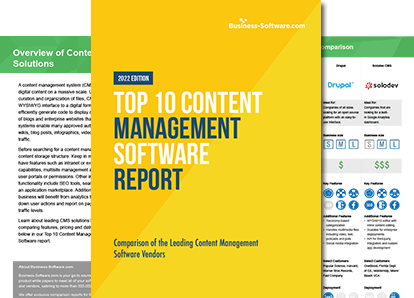
Looking for top-tier content management software?
Compare leading solutions here.
Download FREE ReportAbout Content Management Software
Content management software platforms streamline and standardize the creation, editing, sharing and databasing of all the content you need to keep your business running. The best CMS software can be specialized to fit a variety of needs from enterprise content management, document management, intranet content management, web content management and mobile content management. Browse the top content management platforms in Business-Software.com’s Top 10 CMS report as well as other top 10 comparisons and whitepapers. To get updates on the best CMS software by following Business-Software.com's specialized expert Twitter handle. Content management platforms come in a wide variety of forms that range from fast, easy-to-use, lightweight mobile platforms to complex, powerful solutions. Among the top-rated content management software products are:- WordPress CMS
- Sitecore CMS
- Joomla!
- Drupal
- Microsoft Sharepoint
Articles
-
CMS Software Reviews
CMS Software Reviews Articles

Comparison of the Big Three WCM: Wordpress, Joomla and Drupal
By
Finding the right Web Content Management System (WCM) can be difficult or just downright stressful, which is why many companies turn to the three most popular free-to-use WCM: WordPress, Joomla, and Drupal. WCM is a software solution that allows you to oversee everything from editing, reviewing, and publishing electronic text. With so many different functions and options on each of these WCM, it can be intimidating to figure out which one will suit you best.

From the Community: Best Web CMS for Non-Developers
By
Every business needs a web CMS in order to survive. A shop with a neon “open” sign may not win traction, and the old “word of mouth” has been replaced with the “share” button. In a world full of texts, tweets, posts and shares, having no voice at all on the web can be detrimental to your small business.

The Best Software for Open Source Content Management
By
Open source CMS solutions are great - offering all of the benefits of streamlining content management without the hefty price. But, with so many on market, it can be hard knowing which to choose. Luckily, we've compiled a short list of the best open source content management software out there to help.

Let's Talk Liferay: Behind the Software with CMO Paul Hinz
By
Liferay has always defined itself as an enterprise portal software company free from VC funding. Without stakeholders, Liferay serves as a "ray of life," cultivating a rich office culture that encourages developers to become philanthropists, travel, and provide relief to devastating natural disasters. We had the pleasure of speaking to Liferay CMO Paul Hinz about Liferay's accomplishments, both on its CMS platform and within its open source community.
-
Document Management Software
Document Management Software Articles

The Truth About Data Security in Document Management Systems
By
The term ‘document management system’ generally refers to the suite of software used by enterprises to quickly store and easily retrieve documents from a virtual cache. However, the spate of security breaches over the past couple of years has thrown the focus over to data security. The use of high ... (more)

Document vs. Contract Management: Is It Time to Trade in Your “Jack-of-all-trades” Tool?
By
Many companies can effectively run their contract management functions off of a document management system which ticks the initial boxes including storage, easy access, and collaboration. But for companies with complex contract processes, contract lifecycle management (CLM) is the only contract management option for a number of reasons.

"Cloudy" Document Management Forecast for SMBs
By
While small businesses may not face the sheer volume of information as a typical enterprise, efficient document management is even more important because these companies do not have large staff members or the luxury of time to locate files if they are not readily available.
Mobile Business App: Google Drive Review
By
With Google Drive, Google has entered the cloud storage market, competing with established players like Dropbox and Box.net. Google Drive lets you upload and access your files from anywhere—everything from documents to PDFs to videos, photos and more.
-
Enterprise Content Management (ECM)
Enterprise Content Management (ECM) Articles

What is Enterprise Content Management Software?
By
Enterprise content management is as much a component of overall business strategy as it is a technological solution. If the nature of unstructured data implies chaos, then a top-rated ECM system strives to wring order (or at least value) out of that chaos.

5 Tips to Integrate DotNetNuke with Sharepoint
By
Need to build an engaging website with the optimum tools to date? DotNetNuke is one of the best contenders out there. With myriad challenges facing businesses today such as changing content demands, DNN provides a host of solutions to address the evolving interests of the masses and their corresponding technology needs.

CMS vs ECM: A Digital Crossroads
By
Building an online presence to bolster your business is essential, whether you want to hit the ground running with a brand-new venture or are aiming to cultivate a blog to catch the traffic you might be missing. Regardless of why you’ve started down this path, the internet has placed you at a crossroads that many have faced before you: CMS vs ECM.

Without ECM, Accounts Payable Visibility Is Out the Window
By
Without the use of enterprise content management (ECM) and its streamlined AP processes, providing an accurate and well-informed decision to these questions can be difficult to say the least. Because ECM presents businesses with a new, clearer understanding of time and money through streamlined processes, greater insight and organization, there's no more decision making "in the dark."
-
Free CMS Platforms
Free CMS Platforms Articles
The Best Software for Open Source Content Management
By
Open source CMS solutions are great - offering all of the benefits of streamlining content management without the hefty price. But, with so many on market, it can be hard knowing which to choose. Luckily, we've compiled a short list of the best open source content management software out there to help.

The Best-Value CMS Platform
By
We started with 20 CMS, then painstakingly cut that number to three. These three open source content management systems each have rich features and a thriving marketplace that provides additional modules, plugins and skins at a reasonable price.

MODX vs. Concrete5: Which Content Management System Is Best for Your Client?
By
If you are wondering how MODX and Concrete5 differ, you have come to the right place. Here we will explore the differences so that you, as either a web developer or a business owner, can intelligently pit MODX vs. Concrete5 to decide which is best for a given company, brand or product.

Best Free Content Management Systems
By
So far in this series we’ve written about the best free small business accounting software, CRM systems, web conferencing services, ERP systems, and EMR solutions. While all of these segments feature high quality products, no segment quite compares to the quality and diversity of freely available software found in the web CMS segment. Check out our picks for some of the top free content management solutions available.
-
Trends in Content Management
Trends in Content Management Articles

Knowledge Management vs. Content Management: What's the Difference?
By
Content management and knowledge management are so similar that we forget to make a distinction between them. Products that are self-proclaimed content management systems are actually knowledge management systems, and vice versa, making a confusing mess for buyers. Lucky for you, you have encountered this comprehensive guide to Content Management vs. Knowledge Management. As long as you bear with us, you will perfectly and succinctly understand the difference between content management and knowledge management.
Behind the Software: Q&A with Kaybus CEO Seenu Banda
By
By providing users with a consumer-like enterprise platform that collects, organizes, identifies and recommends valuable data, the team at Kaybus moves to take knowledge management to a new level; what they call knowledge automation. In this Q&A with Kaybus we spoke with Seenu Banda, CEO, about the company’s passion for delivering quality knowledge and its fast-growing appeal to customers since coming out of stealth mode.

Knowledge Management and Social Media: A Friendship At Odds
By
Social media and knowledge management: one organizes the information of a company while the other organizes the voices of the world. Yet the two distinctly alike tools are not friends. They are also two distinctly different ways to organize information -- but why?

Knowledge Management 101
By
Knowledge management software turns the nightmare of managing your business’s information into an enjoyable, productive experience for your company. We’ve compiled a knowledge management 101 guide to take you through the basics of knowledge management software and its key features.
- View All Blog Posts
Popular Content Management Solutions

WordPress
WordPress is open source CMS software the enables users to create and manage blogs, websites, portfolios and online stores. The platform allows users to register unique .com, .net, .org, and .me domain names, maps existing domain names to a WordPress site, and provides users with hundreds of customizable site design themes.

Oxcyon Centralpoint
Centralpoint is a leading Digital Experience Platform used by hundreds of organizations in a myriad of verticals. It enables organizations to author and manage content, allows each user access via single sign on, and the information can be served to each constituent audience from a singular, central point. The platform's integration with Active Directory, LDAP, oAuth, Salesforce and other tools allow for secure authentication of any user including employee, client, partner and affiliate. Centralpoint considers all of information types including documents, webpages, mobile and design so that each user is provided with a unique online digital experience. Centralpoint streamlines all digital strategies by giving users one place to manage information, which cascades down to the users who need it within the organization.

Microsoft SharePoint
SharePoint enables people to work together on content, information and line-of-business data with a large set of integrated capabilities.

- Bridgeline Digital iAPPS Content Manager
Bridgeline Digital iAPPS Content Manager was built to include critical search engine optimization tools (SEO) to help companies improve their online presence. iAPPS Content Manager provides users with an easy-to-use interface that was designed for business users and doesn't require technical expertise to publish content. Bridgeline Digital iAPPS Content Manager helps marketers make changes to their web content without needing to engage IT resources.

Percussion CM1 Cloud
Percussion CM1 Cloud is a web content management solution that's designed to increase web traffic, conversions and social interactions. This top CMS software enables organizations to manage multi-site and multi-channel websites with rich media, while leveraging social media and managing all content.

Sitecore CMS
Sitecore CMS is a scalable and intuitive solution built with functionality to help businesses create dynamic, fully featured web experiences. The platform is built with powerful tools that allow businesses to create and customize their sites to fit their target audiences, improving conversion rates and search engine visibility.